Shared Data

Shared CRM and Billing Data

The CRM and the billing platform are the same system. That changes what the CRM is able to know.

The problem with two systems

A reseller with a separate CRM and billing system does the same work twice. A salesperson types a customer into the CRM. Someone types them into billing again when the deal lands. The tariff gets keyed a second time, and this time a digit is wrong.

Then the drift starts. The CRM says the customer is on the old package. Billing says otherwise. Nobody is sure which is right. Two records disagreeing about the same customer is also an accuracy problem, and the ICO's accuracy principle expects you to keep personal data correct and up to date. A connector is meant to keep them level, until the day it quietly stops and no one notices for a fortnight.

SAFE CRM does not solve this with a better connector. There is no connector. Sales and billing write to the same record.

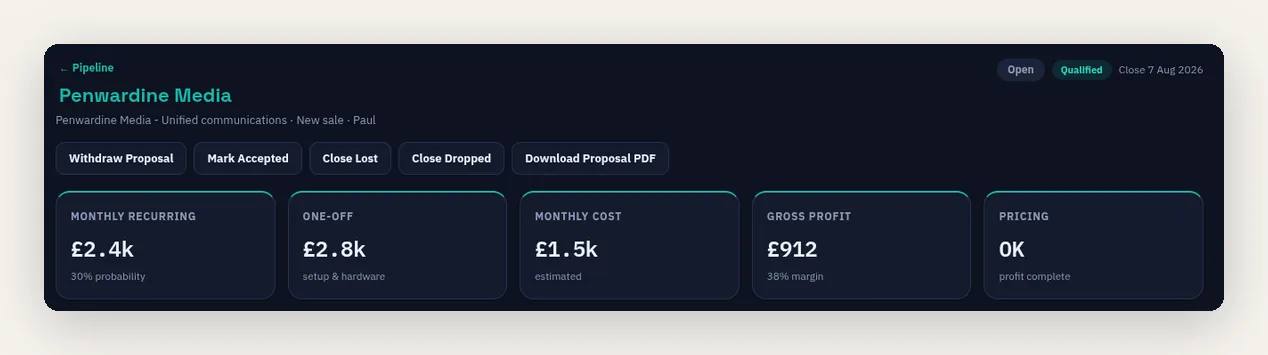
A SAFE CRM deal header showing monthly recurring revenue, one-off charges, monthly cost, gross profit and a pricing check, all calculated from the billing platform's own tariffs

How a deal becomes a bill

The journey from first quote to first invoice happens on one set of records. Here is each step, and what changes.

  1. 1. The lead

    A prospect is created as a customer record flagged as a lead. It looks like a customer because it is one. It simply has not started paying you yet.

  2. 2. Pre-sale products

    Numbers, services and features are attached to the deal with real tariffs and real prices, but a pre-sale status. Billing runs skip them entirely, so they cannot be invoiced by accident.

  3. 3. The quote

    The proposal is generated from those same records. Monthly and one-off totals are calculated by the billing engine, not typed into a document.

  4. 4. The win

    The customer accepts online. The deal is marked won and joins the go-live queue with the activation date you set.

  5. 5. Go-live

    Someone with billing access brings the deal live, and the pre-sale records become live billing records dated from your activation date. For a renewal or upgrade, the existing service is amended in place instead of duplicated.

  6. 6. The invoice

    The next billing run picks up the activated product records. Nobody re-keyed the quoted products at any point. The usual rules still apply for usage, tax, pro-rating and activation dates.

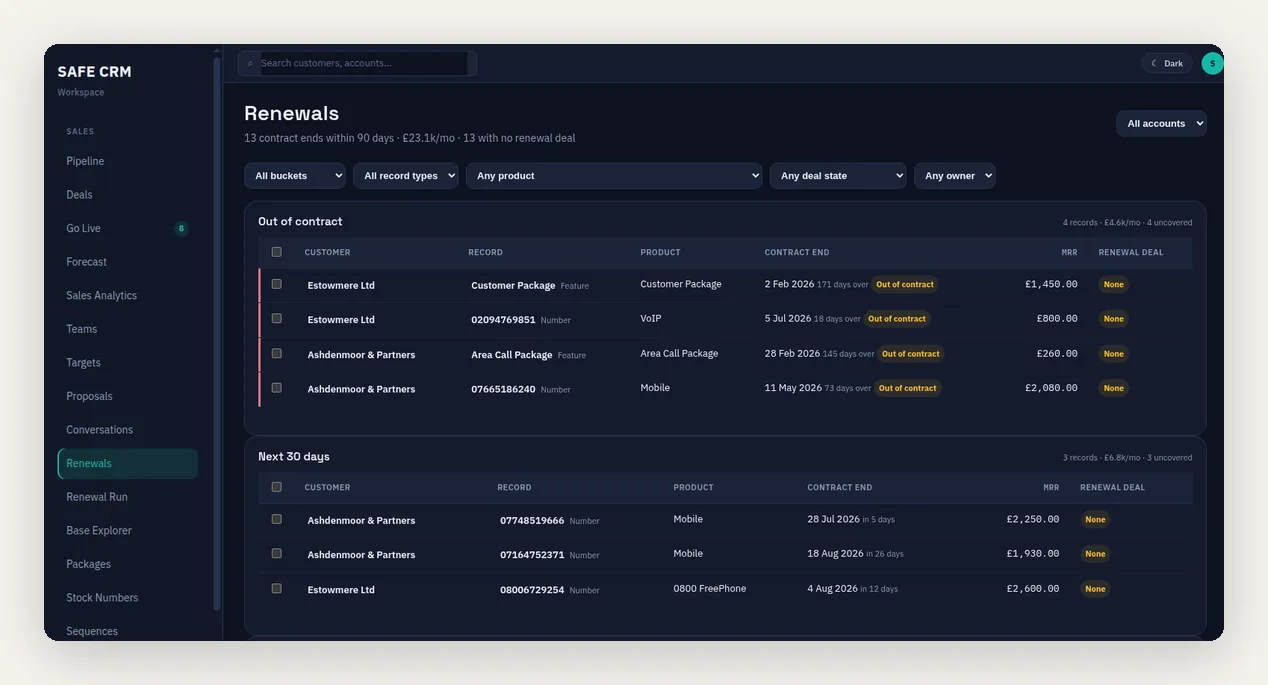
The SAFE CRM renewals radar listing contracts by how soon they end, from already out of contract through the next 30 days, with the monthly revenue at risk on each record and whether a renewal deal covers it

What a standalone CRM cannot do

These are not clever features. They are ordinary questions, and a separate CRM can only answer them through an integration somebody has to maintain. SAFE CRM reads the records directly.

Renewals radar

Every contract ending in the next 30, 60 or 90 days, with the monthly revenue attached and a note of which deals already cover it. The dates come from the service records, so there is nothing to maintain. With the PSTN switch-off due in January 2027, this is the queue most resellers need first.

Margin watch

Sell price and carrier cost live on the same record, so the platform can flag anything sold below cost, anything missing a cost, and anything under your margin floor. You see the profit leak before the year end does.

Customer health scoring

A nightly score built from five signals in live data: usage, payments, support activity, contract position and account changes. Accounts that drop sharply appear on an at-risk list while you can still do something about it.

Base explorer

Search your whole installed base by product, tariff or contract position, then create renewal deals or follow-up tasks for everything you find in one go. Useful for tariff rises, end-of-life products and switch-off planning.

Churned revenue reporting

What you lost last month, priced from real services, grouped by the reason recorded when each one ceased. Retention rate and dropped MRR sit next to what you won.

Credit control in context

Chasing reads the invoice ledger and the collection results directly. The daily sweep drops a customer who has paid off the list, and nothing goes out without a final check first.

Separate workspace, same data

Sharing data does not mean sharing screens. Your sales team should not have to learn billing to do their job.

The CRM is its own workspace with its own layout, its own dashboards and its own light and dark themes. A salesperson lands on their pipeline, not on a billing run. A credit controller lands on their chase queue.

Permissions are set per section, so you decide who sees what. A rep can be given deals and quotes without invoices. A credit controller can be given chase queues without the sales forecast. Managers can be given both. Everything stays inside one audit trail.

Shared Data Questions

What does shared data actually mean here?
It means one database, not two systems talking to each other. A customer in the CRM and a customer in billing are the same row. When a salesperson quotes a hosted seat at £12, that price sits on a real product record, and the same record carries into go-live when the deal is won. Nothing is copied across, so there is no second version to disagree. The first invoice can still differ for the usual reasons: usage, tax, pro-rating, when the service went live, and anything changed since.
How does a lead avoid being invoiced by mistake?
Pre-sale products carry a status that billing runs ignore. They hold the tariffs and prices you quoted, they appear in deal totals and on the proposal, but they are invisible to invoicing. They only convert to live records when the deal is won and somebody with billing access brings it live. Until then they cannot be billed, even in error.
What happens when a deal is won?
It joins the go-live queue with the activation date you set. Someone with billing access then brings it live, and the pre-sale records become live billing records dated from that activation date. For a renewal or an upgrade, the CRM amends the existing service in place rather than creating a duplicate. The queue shows what is waiting and flags anything not ready, such as a number that still needs porting or a deposit still outstanding.
Where does the renewals radar get its dates from?
From the contract dates already held against each service. There is nothing to import and no separate renewals spreadsheet to maintain. The radar groups everything ending in the next 30, 60 or 90 days, shows the monthly revenue at stake, and tells you which of it is already covered by an open deal.
How is the customer health score worked out?
It is calculated each night from five signals drawn from live data: usage trend, payment behaviour, support activity, contract position and account changes. Each customer gets a score with a breakdown, so you can see why it moved. Accounts that fall below your chosen threshold, or drop sharply in 30 days, land on an at-risk worklist with a one-click follow-up.
Can I stop a customer being health scored?
Yes. An account flag excludes a customer from scoring entirely, and existing scores for that customer are removed. Scores are kept for 90 days in full, with month-end snapshots held for 13 months, then pruned automatically.
Can I use SAFE CRM without the SAFE Billing Platform?
Not at first. SAFE CRM is a module of the platform, and the first rollout is to customers already billing with us. Shared data is most of the point, so that is also where it earns its keep: the renewals radar, margin watch, health scoring, credit control and go-live all read your billing and service records. We would like to offer standalone use later if enough people want it. If you are billing elsewhere today, talk to us and we will be honest about which parts would still be worth having.
What does MRR mean?
MRR (monthly recurring revenue) is the predictable part of your monthly turnover from recurring services such as line rentals and hosted seats. The renewals radar and forecast both work in MRR, because that is the number at risk when a contract ends.
What does churn mean?
Churn is customers or services leaving you, usually quoted as a percentage of the base you started the period with. SAFE shows you the services lost and the recurring revenue that went with them. What replacing that revenue costs you depends on how you win customers, which is why early warning matters.
Next step

See It On Your Own Data

The quickest way to understand shared data is to watch a quote turn into an invoice on your own customer base. Book a demo and we will do exactly that.