
Credit Control for Telecoms Resellers
Organise overdue invoice work with the customer’s payments, disputes and collection history in view.
Work from the recorded account position
A telecoms customer can have several recurring invoices, a failed collection and a query about part of a bill at the same time. SAFE Credit Control brings that context into the collection workflow so staff can establish what is due and what needs investigation.
Overdue invoice information, payments and allocations provide the starting point. Eligible actions recheck the recorded balance and protections before proceeding. A payment received outside the platform must be recorded before the workflow can recognise it.
Set the collection policy and enrolment rules
Configured chase stages define the timing and type of follow-up. Automatic enrolment applies where enabled and where the item meets the relevant conditions; outstanding debt is not a promise that every invoice will automatically enter a chase.
Contact stages can send automatically or create correspondence for approval. Manual non-contact stages can assign a call or review. This gives the reseller a defined policy while retaining a person’s decision where the next action needs judgement.
Protect disputes and sensitive customer circumstances
Disputed charges, complaints, vulnerability and other holds can affect contact, charges and restrictions. The workflow checks the relevant protection and its scope instead of treating every account as an ordinary commercial collection.
Staff should review the affected amount and recorded reason. A dispute can protect a particular invoice or amount while other eligible debt remains actionable, subject to wider holds. Sensitive actions retain their approval and financial-permission checks.
Record payment promises and investigate collection issues
A promise to pay records an expected amount and date for follow-up. Where the customer payment-delay option is enabled, the self-service journey supports one permitted date for the full current collectible balance, with checks if that balance changes.
Staff can follow up the promise and check whether the payment has been recorded. Failed collections, missing automatic payment methods and expiring cards have their own worklists, so the team can address the underlying issue rather than repeating the same reminder.
Review the communication and its outcome
Approval queues keep prepared correspondence distinct from dispatched contact. Communication history helps staff establish what was sent, when it was sent and what the next action should be.
The history distinguishes prepared correspondence from recorded sending or download events, giving staff the context for the next collection action.
Measure money collected and remaining exposure
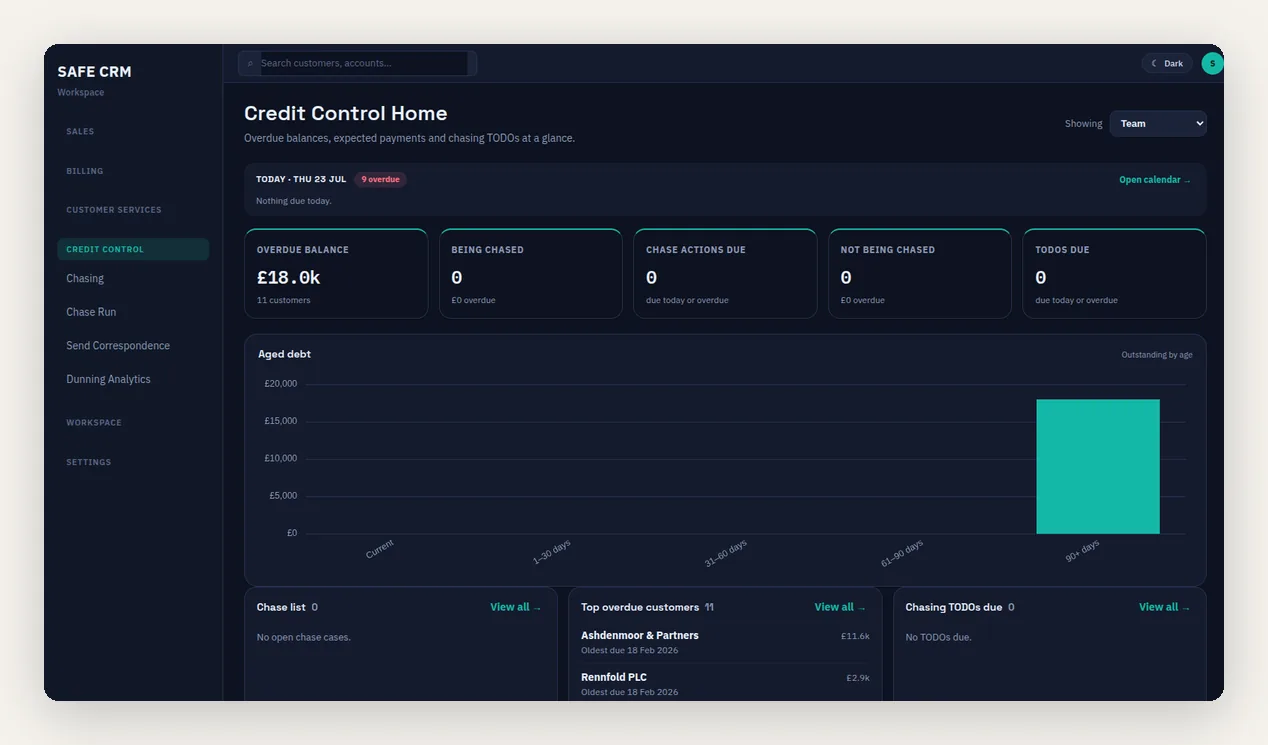
Aged debt, operational worklists and collection measurements support different parts of the review. Recorded collections are distinguishable from credits, write-offs and balance corrections, so a reduced balance is not automatically reported as recovered cash.
Former-customer debt and credit worklists help identify residual balances. A final-bill account appearing in a list does not itself qualify for the reviewed VAT-aware write-off workflow, which requires the applicable fully dropped status and financial checks. Pre-pay reports separately show top-ups, approaching triggers and setup issues.
Choose access and a suitable starting policy
Credit Control requires the relevant module, workspace access and underlying permissions. Review the customer classifications, templates and approval responsibilities before enabling broader automation.
The automated credit control article explains the relationship with late-payment charges. The reseller credit control guide covers the wider operating process.
Questions about credit control for telecoms resellers
Does every overdue invoice enter a chase automatically?
Can reminders wait for approval?
Does a promise to pay take the payment?
Can disputed charges be protected without stopping all collection?
Does a smaller debtor balance mean the chase recovered cash?
Review a Collection Cycle
Follow an overdue telecoms invoice through the recorded balance, contact policy, payment promise and collection outcome.