
Contract Renewals for Telecoms Resellers
Organise account reviews from the contracts and services already held in your billing platform.
Prepare the renewal with the account context
A renewal conversation needs the current services, prices, end dates and any unresolved customer issues. SAFE CRM brings those records into the reseller’s workspace so that preparation starts from the installed base.
The Renewals Radar reads contract dates from supported service, number and feature records. That reduces the need to maintain a separate renewal list, while leaving your team responsible for the accuracy of the source data.
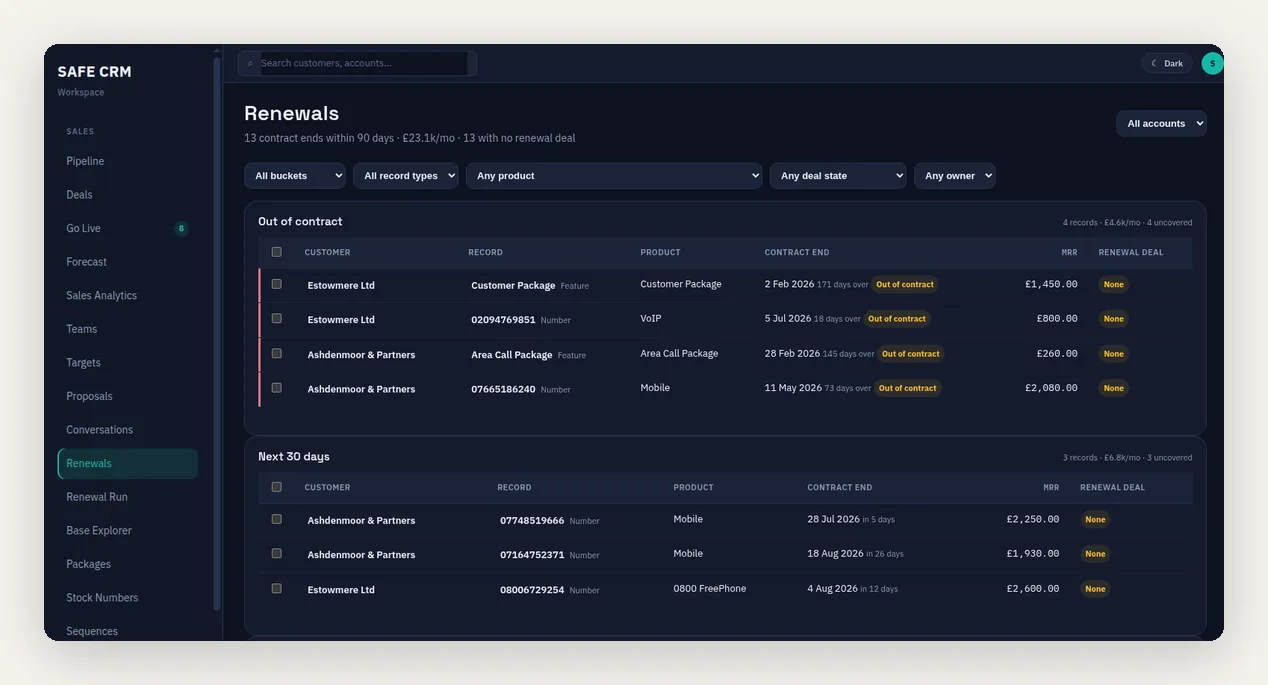
Review the next 30, 60 and 90 days
Time bands show records already out of contract and those ending in 0–30, 31–60 and 61–90 days. Recurring value and customer context help the team organise its review, with currency kept explicit.
The expiry of a minimum term does not necessarily end the service or remove notice requirements. Check the agreement before deciding what the date means for the customer’s options.
Identify coverage and create the next action
Open renewal-deal coverage shows which records have already been picked up. Filters help identify work without an open opportunity and assign the next conversation to the appropriate owner.
Optional Platform Pack capabilities extend this with Base Explorer and renewal automation. Base Explorer supports product-led reviews, such as services marked as legacy, while automation can create repeatable renewal work where configured.
Plan migrations alongside commercial renewal
A product withdrawal can require action before a contract ends. Use product classifications and the actual service inventory alongside contract dates to establish the affected scope.
The PSTN migration article explains this distinction. A renewal report is a useful commercial worklist, but it does not identify every connected device or certify technical readiness.
Apply the agreed change to the existing service
The renewal workflow retains the relationship with the existing record. Authorised staff can review the accepted terms and effective date before the billing change takes effect, reducing the risk of creating a duplicate charge.
Report retained revenue separately from expansion, reductions and losses. Renewing at the same price preserves the existing base; it does not create the same amount of new recurring revenue again. Renewals begin in the Growth feature set.
Related CRM workflows
Questions about contract renewals for telecoms resellers
Where do the dates come from?
Can we see contracts without a renewal deal?
Does an expired term mean the customer can leave immediately?
Is renewal automation included for every user?
Prepare a Contract Renewal
Review a customer’s existing services, contract dates and proposed terms, then follow the agreed change into billing.